<!DOCTYPE html>
    <html lang="vi" xmlns="http://www.w3.org/1999/xhtml" prefix="og: http://ogp.me/ns#">
    <head>
<title>Hướng dẫn cấu hình Email Server trên OUTLOOK</title>
<meta name="description" content="Bạn đang cần tìm Công ty thiết kế website uy tín tại Hải Dương, Hải Phòng, Hưng Yên, Hà Nội,... hãy tham khảo qua danh sách thông tin công ty tại đây. Liên hệ báo giá web 0969.382.007">
<meta name="keywords" content="bản tin thiết kế website,  thiết kế website hải phòng,  thiết kế web hà nội,  thiết kế web uy tín hải dương">
<meta name="news_keywords" content="bản tin thiết kế website,  thiết kế website hải phòng,  thiết kế web hà nội,  thiết kế web uy tín hải dương">
<meta name="author" content="Công Ty Thiết kế Web tại Hải Dương, Uy Tín, Chuyên Nghiệp, Chuẩn SEO">
<meta name="copyright" content="Công Ty Thiết kế Web tại Hải Dương, Uy Tín, Chuyên Nghiệp, Chuẩn SEO">
<meta name="revisit-after" content="1 days">
<meta name="robots" content="index, follow">
<meta name="coccocbot" content="index, follow">
<meta name="msnbot" content="index, follow">
<meta name="geo.region" content="VN-61*">
<meta name="geo.placenam" content="Hải Dương">
<meta name="generator" content="BTS v4.5x">
<meta name="viewport" content="width=device-width, initial-scale=1">
<meta http-equiv="Content-Type" content="text/html; charset=utf-8">
<meta property="og:title" content="Hướng dẫn cấu hình Email Server trên OUTLOOK">
<meta property="og:type" content="website">
<meta property="og:description" content="Bạn đang cần tìm Công ty thiết kế website uy tín tại Hải Dương, Hải Phòng, Hưng Yên, Hà Nội,... hãy tham khảo qua danh sách thông tin công ty tại đây. Liên hệ báo giá web 0969.382.007">
<meta property="og:site_name" content="Công Ty Thiết kế Web tại Hải Dương, Uy Tín, Chuyên Nghiệp, Chuẩn SEO">
<meta property="og:image" content="https://stcinfotech.vn/uploads/thietkeweb-haiduong.jpg">
<meta property="og:image:url" content="https://stcinfotech.vn/uploads/thietkeweb-haiduong.jpg">
<meta property="og:image:type" content="image/jpeg">
<meta property="og:image:width" content="1080">
<meta property="og:image:height" content="1080">
<meta property="og:image:alt" content="Công Ty Thiết kế Web tại Hải Dương, Uy Tín, Chuyên Nghiệp, Chuẩn SEO">
<meta property="og:url" content="https://stcinfotech.vn/vi/news/savefile/kien-thuc-chung/huong-dan-cau-hinh-email-server-tren-outlook-16.html">
<link rel="shortcut icon" href="https://stcinfotech.vn/uploads/stc.jpg">
<link rel="canonical" href="https://stcinfotech.vn/vi/news/savefile/kien-thuc-chung/huong-dan-cau-hinh-email-server-tren-outlook-16.html">
<link rel="alternate" href="https://stcinfotech.vn/vi/news/rss/" title="Tin Tức" type="application/rss+xml">
<link rel="alternate" href="https://stcinfotech.vn/vi/news/rss/kien-thuc-chung/" title="Tin Tức - Kiến thức chung" type="application/rss+xml">
<link rel="alternate" href="https://stcinfotech.vn/vi/news/rss/ten-mien/" title="Tin Tức - Tên miền" type="application/rss+xml">
<link rel="alternate" href="https://stcinfotech.vn/vi/news/rss/hosting/" title="Tin Tức - Hosting" type="application/rss+xml">
<link rel="alternate" href="https://stcinfotech.vn/vi/news/rss/email-server/" title="Tin Tức - Email Server" type="application/rss+xml">
<link rel="alternate" href="https://stcinfotech.vn/vi/news/rss/ssl/" title="Tin Tức - SSL" type="application/rss+xml">
<link rel="alternate" href="https://stcinfotech.vn/vi/news/rss/xay-dung/" title="Tin Tức - Xây dựng" type="application/rss+xml">
<link rel="alternate" href="https://stcinfotech.vn/vi/news/rss/phat-trien/" title="Tin Tức - Phát triển" type="application/rss+xml">
<link rel="alternate" href="https://stcinfotech.vn/vi/news/rss/blogs/" title="Tin Tức - Blogs" type="application/rss+xml">
<link rel="preload" as="style" href="https://stcinfotech.vn/assets/css/font-awesome.min.css" type="text/css">
<link rel="preload" as="style" href="https://stcinfotech.vn/themes/stchd/bootstrapv5/css/bootstrap.min.css" type="text/css">
<link rel="preload" as="style" href="https://stcinfotech.vn/themes/stchd/css/animate.css" type="text/css">
<link rel="preload" as="style" href="https://stcinfotech.vn/themes/stchd/css/style.css" type="text/css">
<link rel="preload" as="style" href="https://stcinfotech.vn/themes/stchd/css/style.responsive.css" type="text/css">
<link rel="preload" as="style" href="https://stcinfotech.vn/themes/stchd/css/news.css" type="text/css">
<link rel="preload" as="style" href="https://stcinfotech.vn/themes/stchd/css/custom.css" type="text/css">
<link rel="preload" as="style" href="https://stcinfotech.vn/assets/css/stchd.vi.0.css" type="text/css">
<link rel="preload" as="script" href="https://stcinfotech.vn/assets/js/jquery/jquery.min.js" type="text/javascript">
<link rel="preload" as="script" href="https://stcinfotech.vn/assets/js/language/vi.js" type="text/javascript">
<link rel="preload" as="script" href="https://stcinfotech.vn/assets/js/DOMPurify/purify3.js" type="text/javascript">
<link rel="preload" as="script" href="https://stcinfotech.vn/assets/js/global.js" type="text/javascript">
<link rel="preload" as="script" href="https://stcinfotech.vn/assets/js/site.js" type="text/javascript">
<link rel="preload" as="script" href="https://stcinfotech.vn/themes/stchd/js/news.js" type="text/javascript">
<link rel="preload" as="script" href="https://stcinfotech.vn/themes/stchd/css/wow.min.js" type="text/javascript">
<link rel="preload" as="script" href="https://stcinfotech.vn/themes/stchd/js/main.js" type="text/javascript">
<link rel="preload" as="script" href="https://stcinfotech.vn/themes/stchd/js/custom.js" type="text/javascript">
<link rel="preload" as="script" href="https://www.googletagmanager.com/gtag/js?id=G-JWXP7V8Y85" type="text/javascript">
<link rel="preload" as="script" href="https://stcinfotech.vn/themes/stchd/bootstrapv5/js/bootstrap.min.js" type="text/javascript">
<link rel="preload" as="script" href="https://stcinfotech.vn/themes/stchd/js/jquery.ripples-min.js" type="text/javascript">
<link rel="stylesheet" href="https://stcinfotech.vn/assets/css/font-awesome.min.css">
<link rel="stylesheet" href="https://stcinfotech.vn/themes/stchd/bootstrapv5/css/bootstrap.min.css">
<link rel="stylesheet" href="https://stcinfotech.vn/themes/stchd/css/animate.css">
<link rel="stylesheet" href="https://stcinfotech.vn/themes/stchd/css/style.css">
<link rel="stylesheet" href="https://stcinfotech.vn/themes/stchd/css/style.responsive.css">
<link rel="StyleSheet" href="https://stcinfotech.vn/themes/stchd/css/news.css">
<link rel="stylesheet" href="https://stcinfotech.vn/themes/stchd/css/custom.css">
<link rel="stylesheet" href="https://stcinfotech.vn/assets/css/stchd.vi.0.css">
<style type="text/css">
	body{background: #fff;}
</style>
</head>
    <body oncontextmenu="return false">
<div id="print">
	<div id="hd_print">
		<h2 class="pull-left">Công Ty Thiết kế Web tại Hải Dương, Uy Tín, Chuyên Nghiệp, Chuẩn SEO</h2>
		<p class="pull-right"><a title="Công Ty Thiết kế Web tại Hải Dương, Uy Tín, Chuyên Nghiệp, Chuẩn SEO" href="https://stcinfotech.vn/">https://stcinfotech.vn</a></p>
	</div>
	<div class="clear"></div>
	<hr />
	<div id="content">
		<h1>Hướng dẫn cấu hình Email Server trên OUTLOOK</h1>
		<ul class="list-inline">
			<li class="list-inline-item">Thứ năm - 18/04/2024 22:25</li>
			<li class="list-inline-item hidden-print txtrequired"><em class="fa fa-print">&nbsp;</em><a title="In ra" href="javascript:;" onclick="window.print()">In ra</a></li>
			<li class="list-inline-item hidden-print txtrequired"><em class="fa fa-power-off">&nbsp;</em><a title="Đóng cửa sổ này" href="javascript:;" onclick="window.close()">Đóng cửa sổ này</a></li>
		</ul>
		<div class="clear"></div>
		<div id="hometext">
			Dịch vụ lưu trữ thư điện tử dùng riêng theo đuôi tên miền (@domain) với tính năng bảo mật cao, giúp gia tăng niềm tin và độ hài lòng của khách hàng cho Doanh nghiệp của bạn. Hôm nay chúng tôi sẽ hướng dẫn cho các bạn cách cấu hình Email Server Doanh Nghiệp sử dụng trên OUTLOOK.
		</div>
		<div id="bodytext" class="clearfix">
			<p>Để sử dụng <strong>Email server trên Outlook</strong> chúng ta thực hiện các bước sau:</p>

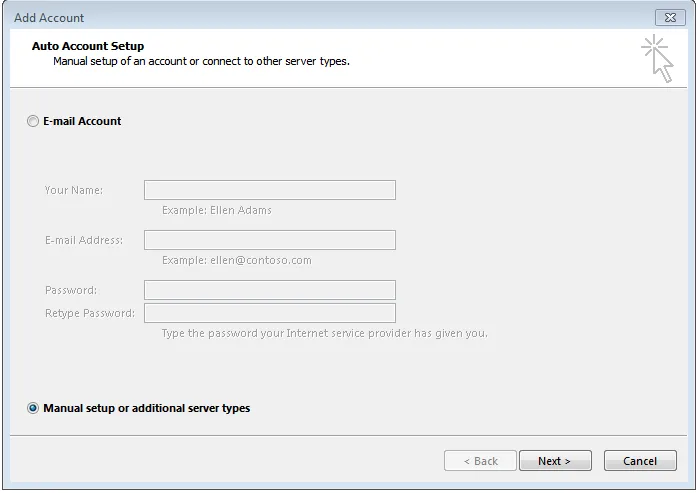
<p><strong>1.&nbsp;</strong>Mở app Outlook sau chọn<strong>&nbsp;Add Account</strong>, sẽ xuất hiện hộp thoại như bên dưới, kích chọn Options “<strong>Manual setup or additional server types</strong>“:</p>

<div class="image-center"><img alt="addnew 1" data-ll-status="loaded" height="493" src="https://stcinfotech.vn/uploads/news/2024_04/addnew-1.webp" width="697" /></div>

<p><br />
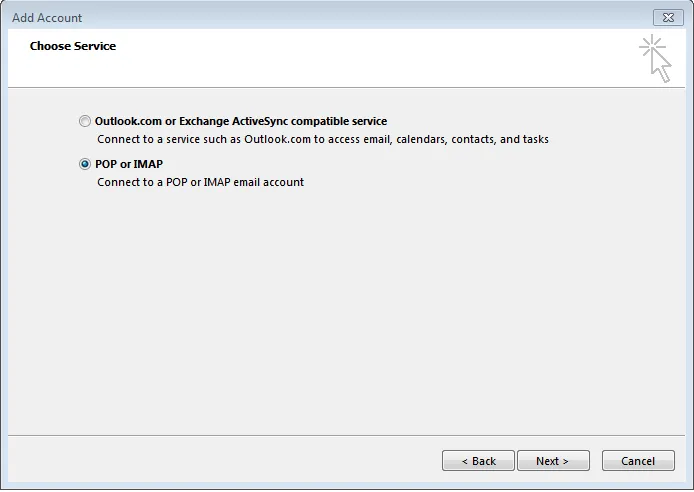
<strong>2.</strong>&nbsp;Nhấn&nbsp;<strong>Next</strong>&nbsp;để tiếp tục, kích chọn<strong>&nbsp;POP or IMAP</strong>&nbsp;và nhấn&nbsp;<strong>Next</strong>:</p>

<div class="image-center"><img alt="popimap 1" data-ll-status="loaded" height="492" src="https://stcinfotech.vn/uploads/news/2024_04/popimap_1.webp" width="694" /></div>

<p><br />
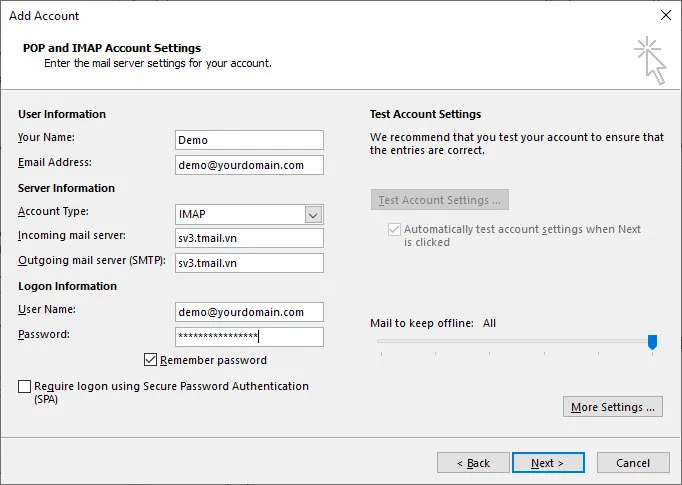
3.&nbsp;Điền đầy đủ thông tin vào các ô tương ứng ở hộp thoại&nbsp;<strong>Add Account</strong>, chú ý ở hai ô&nbsp;<strong>Incoming mail server</strong>&nbsp;và&nbsp;<strong>Outgoing mail server (SMTP)</strong>&nbsp;chúng ta sẽ điền tên máy chủ được cung cấp, ví dụ ở đây là&nbsp;<em><strong>sv3.tmail.vn</strong></em>:</p>

<div class="image-center"><img alt="email1" data-ll-status="loaded" height="485" src="https://stcinfotech.vn/uploads/news/2024_04/email1.webp" width="682" /></div>

<p><br />
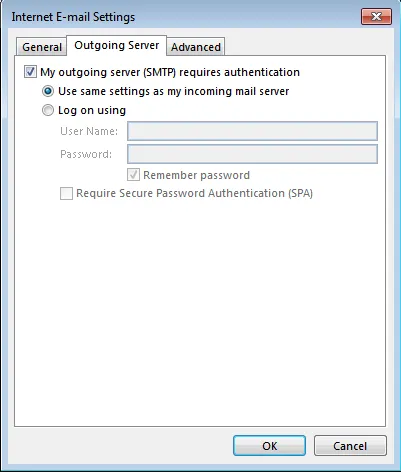
<strong>4.</strong>&nbsp;Kích chuột vào&nbsp;<strong>More Settings…</strong>, sẽ xuất hiện hộp thoai “Internet E-mail Settings, nhấp chuột chọn&nbsp;<strong>Outgoing Server</strong>&nbsp;và tích chọn vào ô “<em><strong>My outging server (SMTP)…</strong></em>” sau đó nhấn&nbsp;<strong>OK</strong>&nbsp;để lưu lại chọn lựa:</p>

<div class="image-center"><img alt="smtp1 1" data-ll-status="loaded" height="472" src="https://stcinfotech.vn/uploads/news/2024_04/smtp1-1.webp" width="401" /></div>

<p><br />
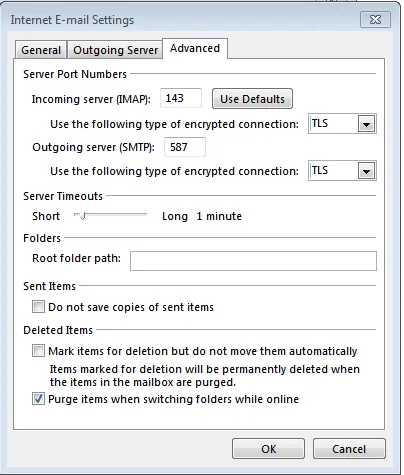
Tiếp theo chọn&nbsp;<strong><em>Advanced</em></strong>&nbsp;ở hộp thoại này để cấu hình các Port cho&nbsp;<em>Income</em>&nbsp;và&nbsp;<em>Outcome</em>, chúng ta chọn như hình ảnh bên dưới (Nếu cấu hình Email với POP3 thì port POP3 sẽ là 995 và SMTP port là 587 đồng thời tích chọn vào ô ssl):</p>

<div class="image-center"><img alt="smtp2" data-ll-status="loaded" height="475" src="https://stcinfotech.vn/uploads/news/2024_04/smtp2.webp" width="404" /></div>

<p>Nhấn OK để hoàn tất việc chỉnh sửa.</p>

<p><br />
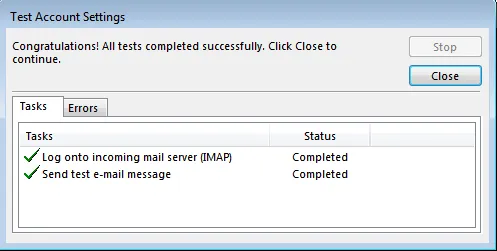
<strong>5.&nbsp;</strong>Nhấn&nbsp;<strong>Next</strong>&nbsp;để máy chủ Outlook kiểm tra việc cấu hình có đúng hay không, lúc này sẽ xuất hiện hộp thoại “<em><strong>&nbsp;Test Account Settings</strong></em>“, nếu xuất hiện hai tick màu xanh và&nbsp;<strong><em>Status</em></strong>&nbsp;là&nbsp;<strong><em>Completed</em></strong>&nbsp;thì là việc cấu hình các thông số đã chính xác, nếu báo&nbsp;<strong><em>Failed</em></strong>&nbsp;thì cần kiểm tra lại các thông số cấu hình. Nhấn&nbsp;<strong><em>Close</em></strong>&nbsp;để đóng lại việc kiểm tra:</p>

<div class="image-center"><img alt="testting" data-ll-status="loaded" height="251" src="https://stcinfotech.vn/uploads/news/2024_04/testting.webp" width="497" /></div>

<p><br />
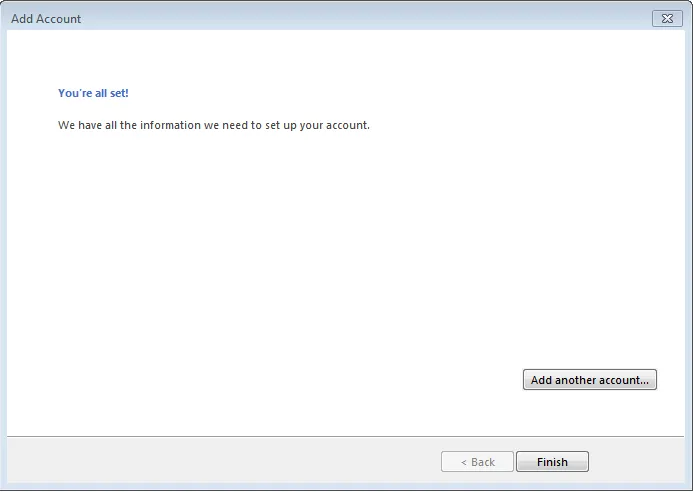
<strong>6.</strong>&nbsp;Nhấn&nbsp;<strong>Finish</strong>&nbsp;để hoàn thành cài đặt:</p>

<div class="image-center"><img alt="finish" data-ll-status="loaded" height="492" src="https://stcinfotech.vn/uploads/news/2024_04/finish.webp" width="693" /></div>

<p><br />
Nếu trong quá trình cấu hình có gặp các lỗi hoặc vấn đề khác, các bạn có thể gửi Email về mail&nbsp;<b><i>sales@stcinfotech.vn</i></b></p>
		</div>
				<div id="author">
						<p>
				<strong>Tác giả:</strong>
				<a href="https://stcinfotech.vn/vi/news/author/Web-Haiduong/">Web-Haiduong</a>
			</p>
		</div>
	</div>
	<div id="footer" class="clearfix">
		<div id="url">
			<strong>URL của bản tin này: </strong><a href="https://stcinfotech.vn/vi/news/savefile/kien-thuc-chung/huong-dan-cau-hinh-email-server-tren-outlook-16.html" title="Hướng dẫn cấu hình Email Server trên OUTLOOK">https://stcinfotech.vn/vi/news/savefile/kien-thuc-chung/huong-dan-cau-hinh-email-server-tren-outlook-16.html</a>

		</div>
		<div class="clear"></div>
		<div class="copyright">
			&copy; Công Ty Thiết kế Web tại Hải Dương, Uy Tín, Chuyên Nghiệp, Chuẩn SEO
		</div>
		<div id="contact">
			<a href="mailto:sales@stcinfotech.vn">sales@stcinfotech.vn</a>
		</div>
	</div>
</div>
        <div class="cookie-notice"><div><button onclick="cookie_notice_hide();">&times;</button>Chúng tôi đang sử dụng cookie để cung cấp cho bạn những trải nghiệm tốt nhất trên trang web này. Bằng cách tiếp tục truy cập, bạn đồng ý với <a href="https://stcinfotech.vn/vi/siteterms/privacy.html">Chính sách thu thập và sử dụng cookie</a> của chúng tôi.</div></div>
        <div id="timeoutsess" class="chromeframe">
            Bạn đã không sử dụng Site, <a onclick="timeoutsesscancel();" href="https://stcinfotech.vn/#">Bấm vào đây để duy trì trạng thái đăng nhập</a>. Thời gian chờ: <span id="secField"> 60 </span> giây
        </div>
        <div id="openidResult" class="nv-alert" style="display:none"></div>
        <div id="openidBt" data-result="" data-redirect=""></div>
<div id="run_cronjobs" style="visibility:hidden;display:none;"><img alt="cron" src="/index.php?second=cronjobs&amp;p=h33lRWEB" width="1" height="1" /></div>
<script src="https://stcinfotech.vn/assets/js/jquery/jquery.min.js"></script>
<script>var nv_base_siteurl="/",nv_lang_data="vi",nv_lang_interface="vi",nv_name_variable="nv",nv_fc_variable="op",nv_lang_variable="language",nv_module_name="news",nv_func_name="savefile",nv_is_user=0, nv_my_ofs=-4,nv_my_abbr="EDT",nv_cookie_prefix="stc2689",nv_check_pass_mstime=1738000,nv_area_admin=0,nv_safemode=0,theme_responsive=1,nv_recaptcha_ver=2,nv_recaptcha_sitekey="6LcmIcApAAAAAI6sQqjB_j6TYe_GcFTjftWlG95Z",nv_recaptcha_type="image",XSSsanitize=1;</script>
<script src="https://stcinfotech.vn/assets/js/language/vi.js"></script>
<script src="https://stcinfotech.vn/assets/js/DOMPurify/purify3.js"></script>
<script src="https://stcinfotech.vn/assets/js/global.js"></script>
<script src="https://stcinfotech.vn/assets/js/site.js"></script>
<script src="https://stcinfotech.vn/themes/stchd/js/news.js"></script>
<script src="https://stcinfotech.vn/themes/stchd/css/wow.min.js"></script>
<script src="https://stcinfotech.vn/themes/stchd/js/main.js"></script>
<script src="https://stcinfotech.vn/themes/stchd/js/custom.js"></script>
<script type="application/ld+json">
        {
            "@context": "https://schema.org",
            "@type": "Organization",
            "url": "https://stcinfotech.vn",
            "logo": "https://stcinfotech.vn/uploads/stc-logo.png"
        }
        </script>
<script async src="https://www.googletagmanager.com/gtag/js?id=G-JWXP7V8Y85"></script>
<script>window.dataLayer=window.dataLayer||[];function gtag(){dataLayer.push(arguments)}gtag('js',new Date);gtag('config','G-JWXP7V8Y85');</script>
<script src="https://stcinfotech.vn/themes/stchd/bootstrapv5/js/bootstrap.min.js"></script>
<script src="https://stcinfotech.vn/themes/stchd/js/jquery.ripples-min.js"></script>
</body>
</html>